
Build full-stack applications without writing code
The platform
Bubble is the world’s only full-stack, no-code platform. It enables anyone to design, develop, and deploy web applications without coding. In the no-code space, it stands out by offering complexity and customization unmatched by other platforms. Users can create custom marketplaces, social networks, or food delivery services without touching a line of code.
The platform covers the entire app-building process, from UI design to backend workflows. Users can create dynamic content, integrate third-party services, and set up complex logic flows. While other no-code tools excel in specific areas, Bubble’s flexibility makes it the go-to choice for bringing complex ideas to life.
What we did
The Maison design system let Bubble achieve rapid customer growth. I led a cross-functional team to overhaul the editor’s user experience. We integrated customer feedback, worked in parallel on features, and coordinated releases to transform the platform’s usability. Maison, the design system we developed, unified the editor’s interfaces under a cohesive component structure.
Maison brought modern standards to Bubble, introducing best practices from leading design tools. The structured framework reduced the learning curve and made it easier to implement new features as the platform grew.
The design language made Bubble competitive with other browser-based design tools. Users could rely on consistent, predictable behaviors across the platform. Maison also introduced enhanced support for responsive design, addressing a long-standing gap in the platform’s capabilities.
Bubble in 2019
It’s early 2019, and using Bubble is a daunting task. Its UI was the result of years of bootstrapped development.1 The interface was burdened with design inconsistencies and heavy technical debt. The editor lacked a cohesive visual language and predictable behaviors. Essential features were often hidden within menus or workflows, making it challenging for users to navigate intuitively.
Using Bubble was like navigating a complex “working wireframe.” Powerful functionalities were scattered and difficult to locate. Users relied on Google searches and community forums to piece together solutions.
Faster than learning to code
“Yeah, it’s a pain, but it’s still way faster than learning to code.” Despite these hurdles, Bubble had attracted over 500,000 registered users. For entrepreneurs and builders, it offered a unique opportunity to launch web applications without hiring engineers or learning to code.
Users were willing to endure the pain points because of the platform’s ability to let them create complex applications independently. Their dedication underscored Bubble’s potential and the need for improvements to reach a wider audience.
Three goals
Bubble needed an overhaul to grow beyond its early adopters. That meant addressing its usability issues and creating a more polished experience. By engaging with entrepreneurs who relied on Bubble and using the platform ourselves, we identified core priorities:
- Create consistent UI appearance and behaviors. Establish a cohesive design language and predictable behaviors across the platform to remove friction and provide a foundation for future development.
- Adopt common precedents from best-in-class design software Incorporate familiar design patterns from tools like Figma and Webflow to make the platform more approachable for users transitioning from other design environments.
- Deliver proper support for responsive design. Modernize the platform’s outdated JavaScript layout engine2 to support apps that adapt seamlessly across different screen sizes.
The new Bubble editor
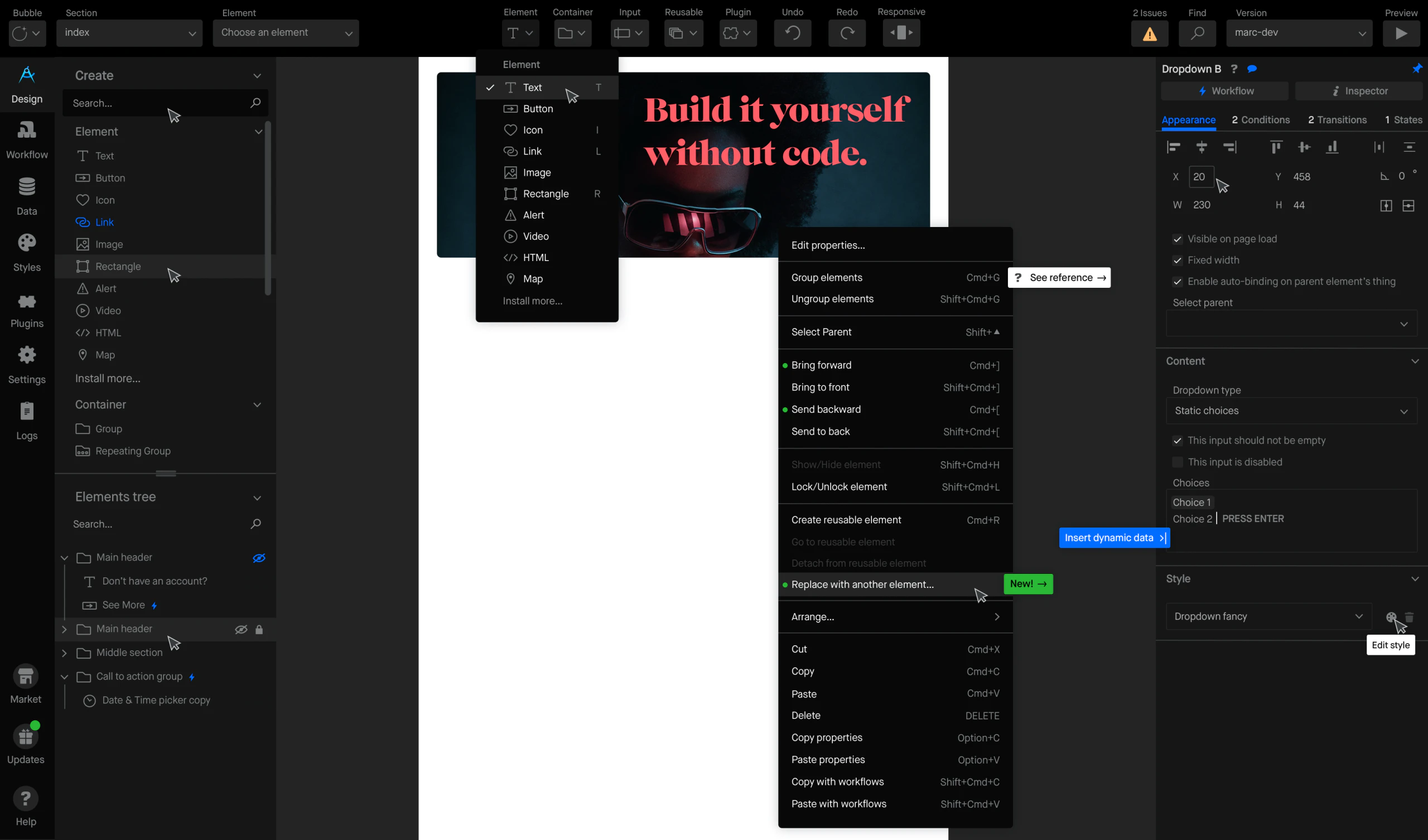
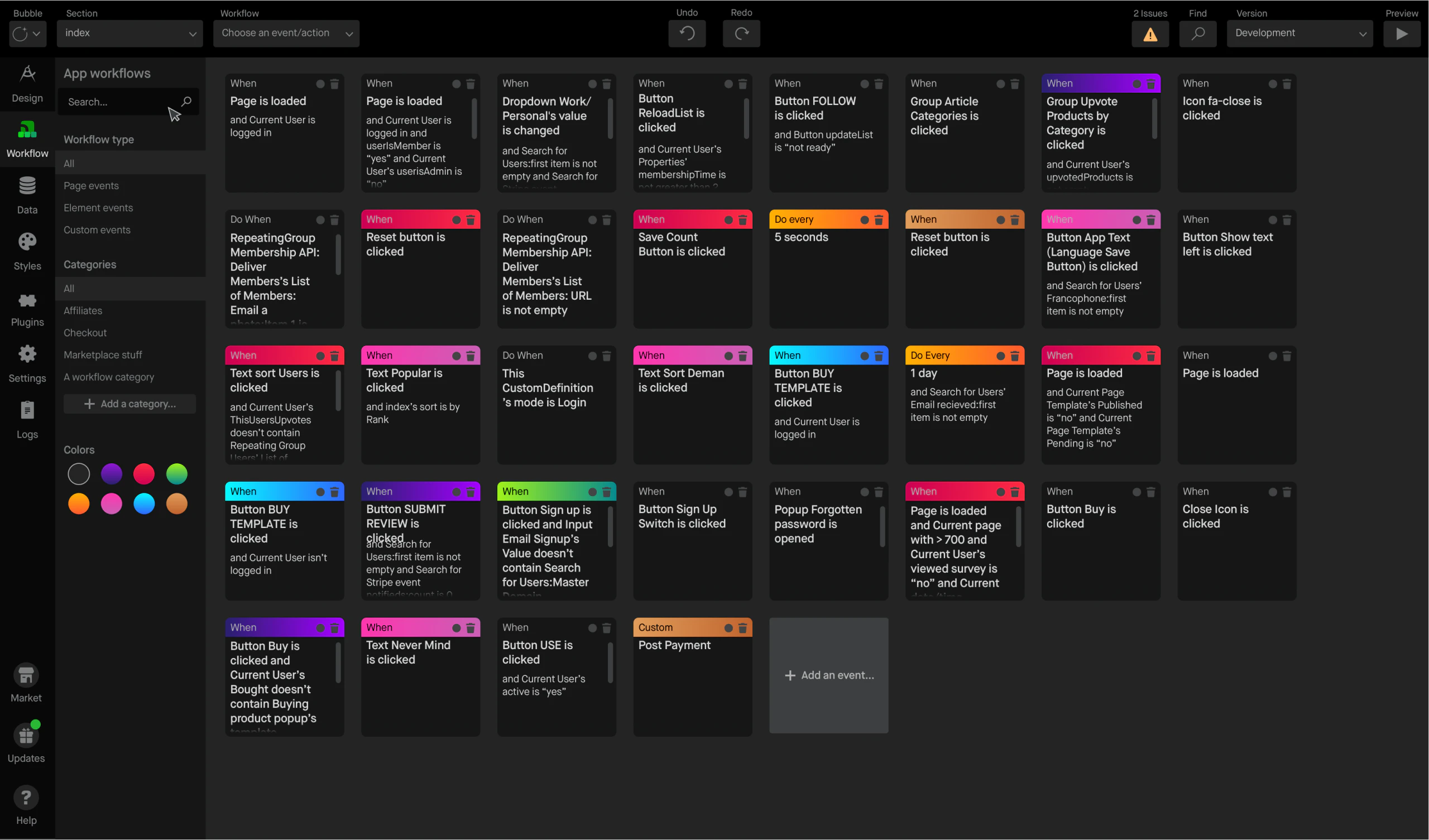
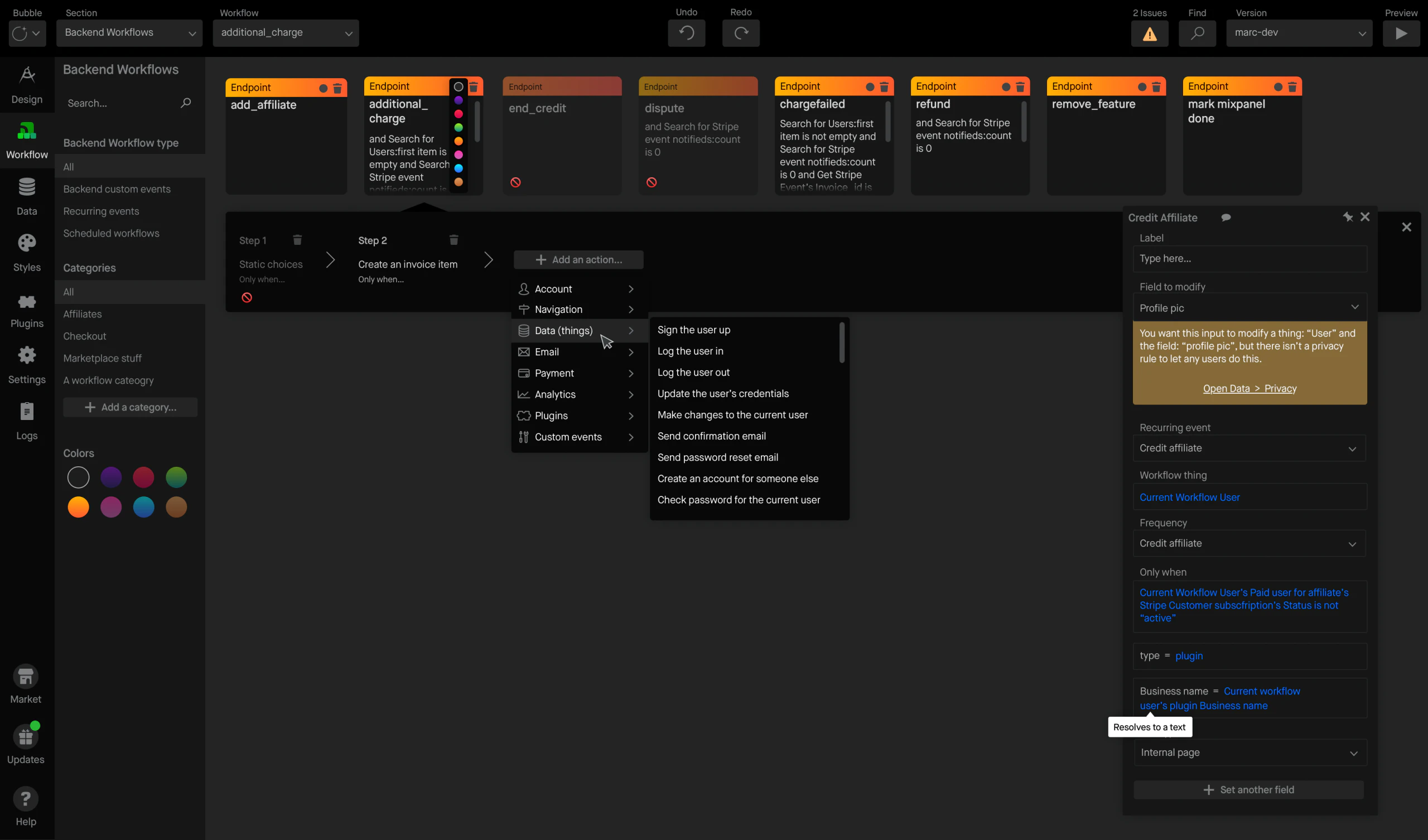
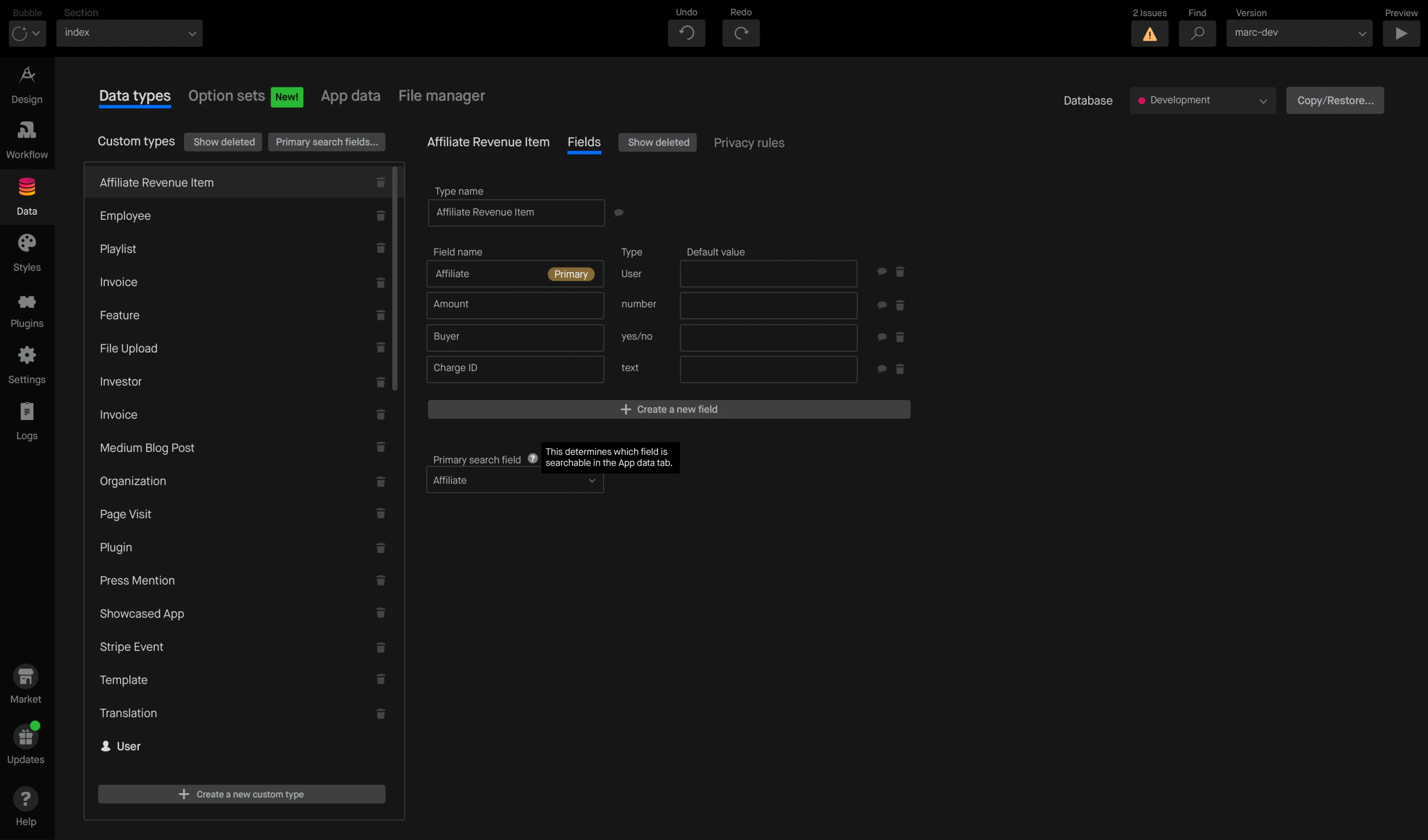
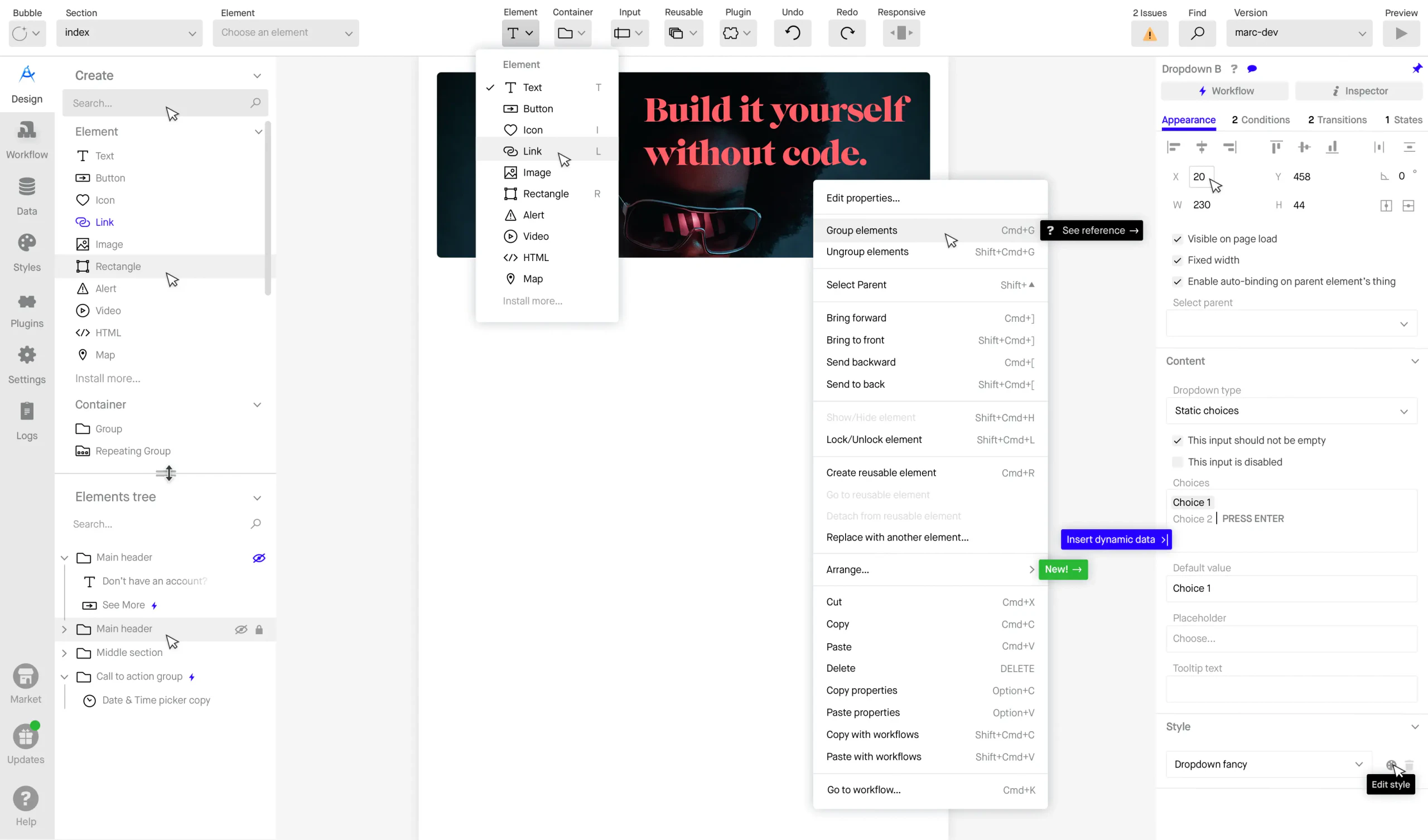
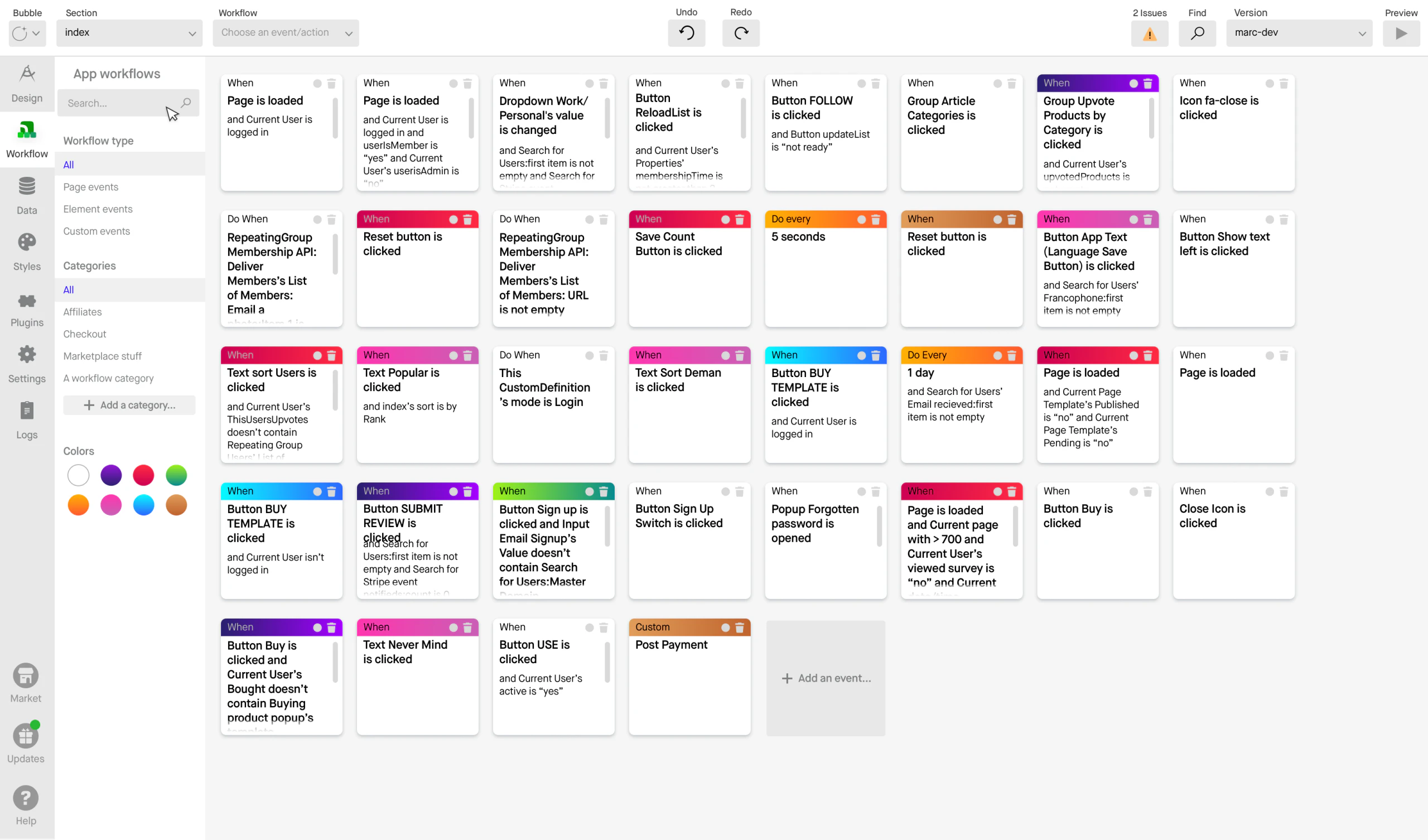
The redesigned editor keeps Bubble’s structure of five tabs, one for each layer of an application, and gives them a shared visual language for the first time. Design, Workflows, Backend Workflows, Data, and Styles now use the same panels, controls, and hierarchy.
A headless design system
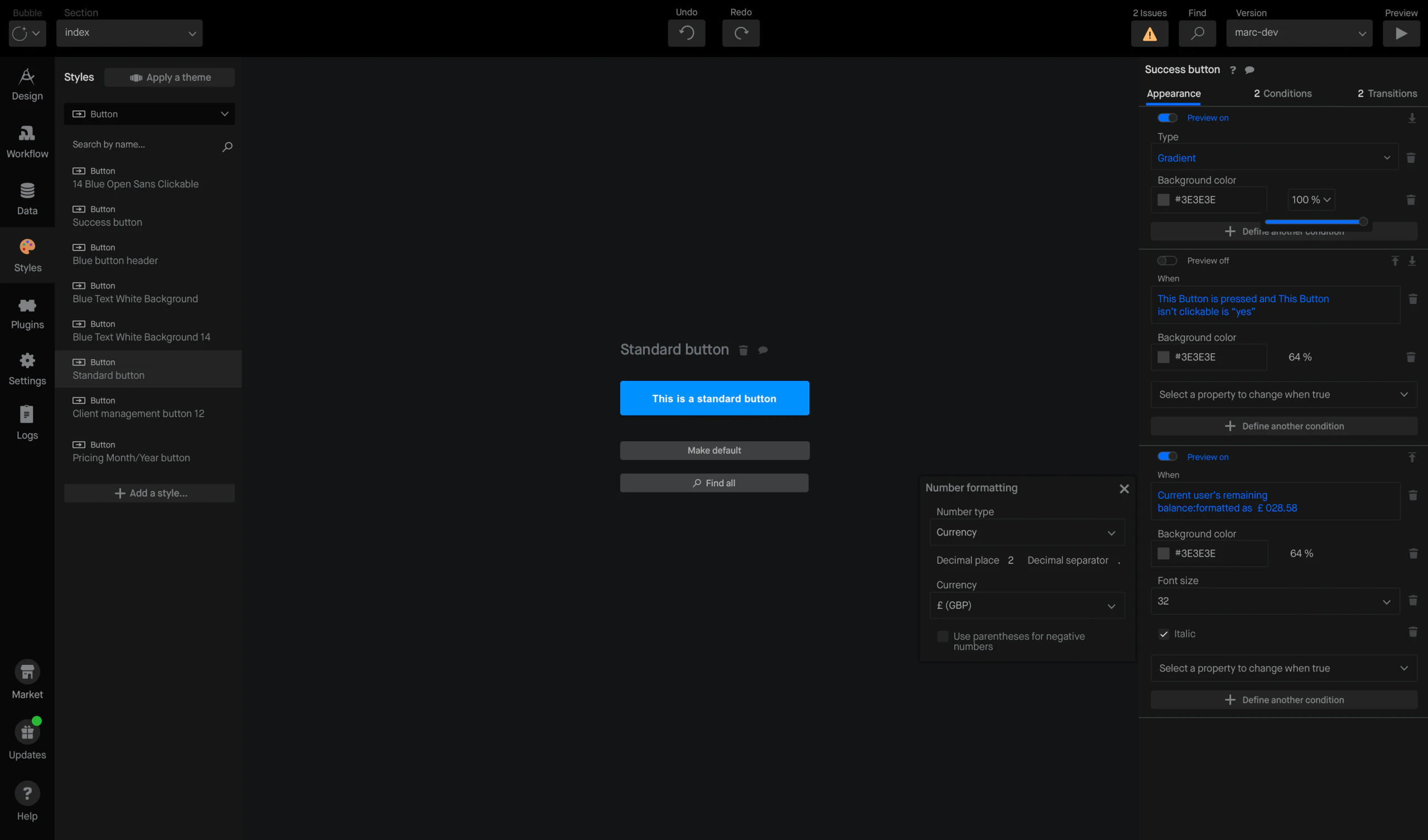
Maison is a headless design system. Unlike most design systems, it separates content from design and layout. This approach lets the Bubble team deploy updates faster using predefined rules to dynamically display variable content. By decoupling visual components from content, the team can manage and deploy designs without reconfiguring the entire system for each change.
The modular nature supports product squads by letting them iterate and launch features without waiting on dedicated design resources. Designers and developers can work independently, speeding up the production pipeline. Product teams benefit from a consistent design language that ensures cohesive experiences across the platform.
Theme switching
Maison was designed with both light and dark modes from the outset. Integrating these modes required a higher-order abstraction of element styles so they could function seamlessly across both themes without duplicating assets. Users can toggle between modes without performance lag. Today, this is usually facilitated via Media Queries Level 5’s prefers-color-scheme, which didn’t yet have broad browser support at the time.3
Responsive design
We built modernized responsive design tools. The new responsive design system was a major release for Bubble: by mixing and matching three basic container types, users can build modern layouts based on the flexbox CSS module.4
Responsive settings
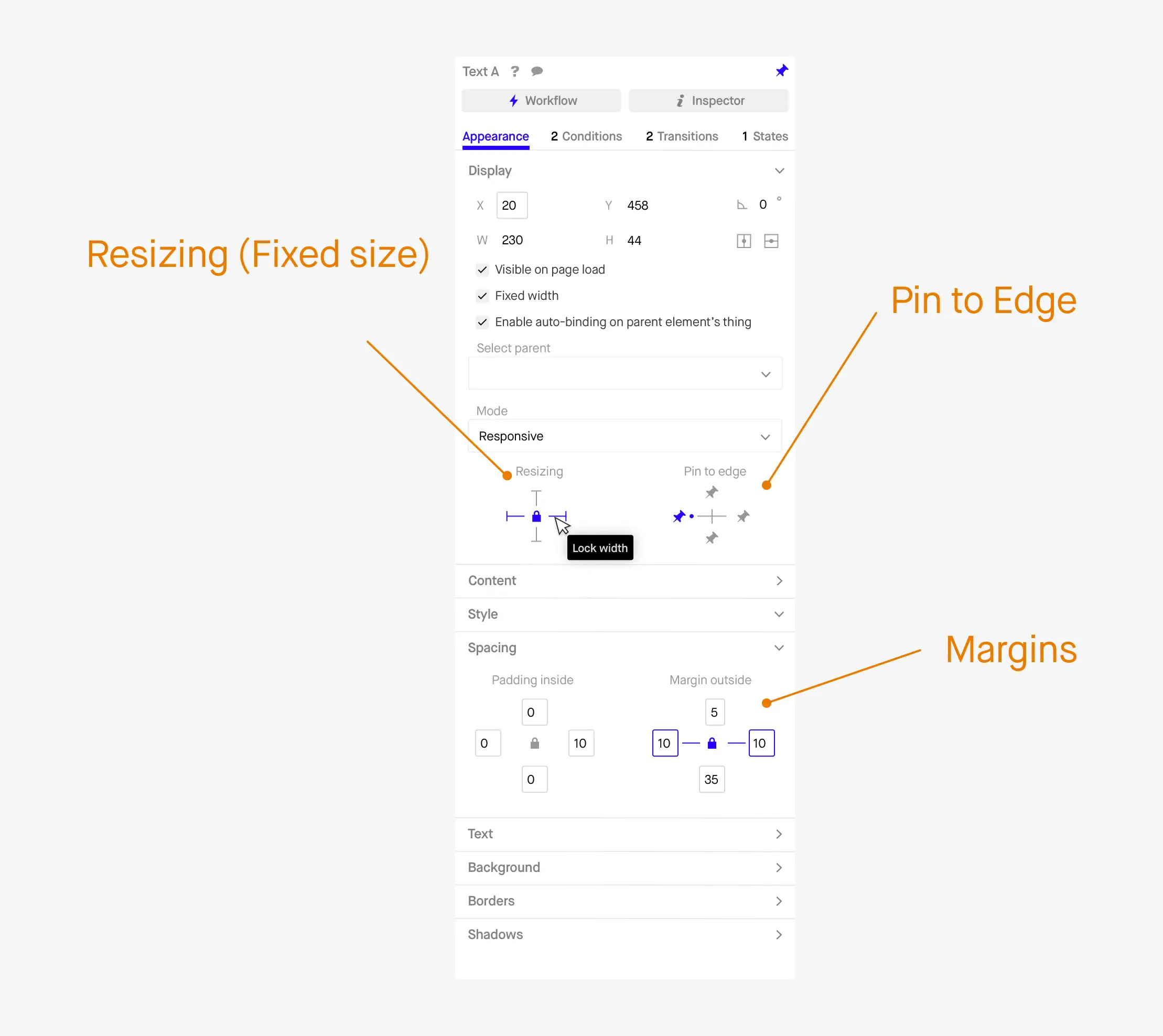
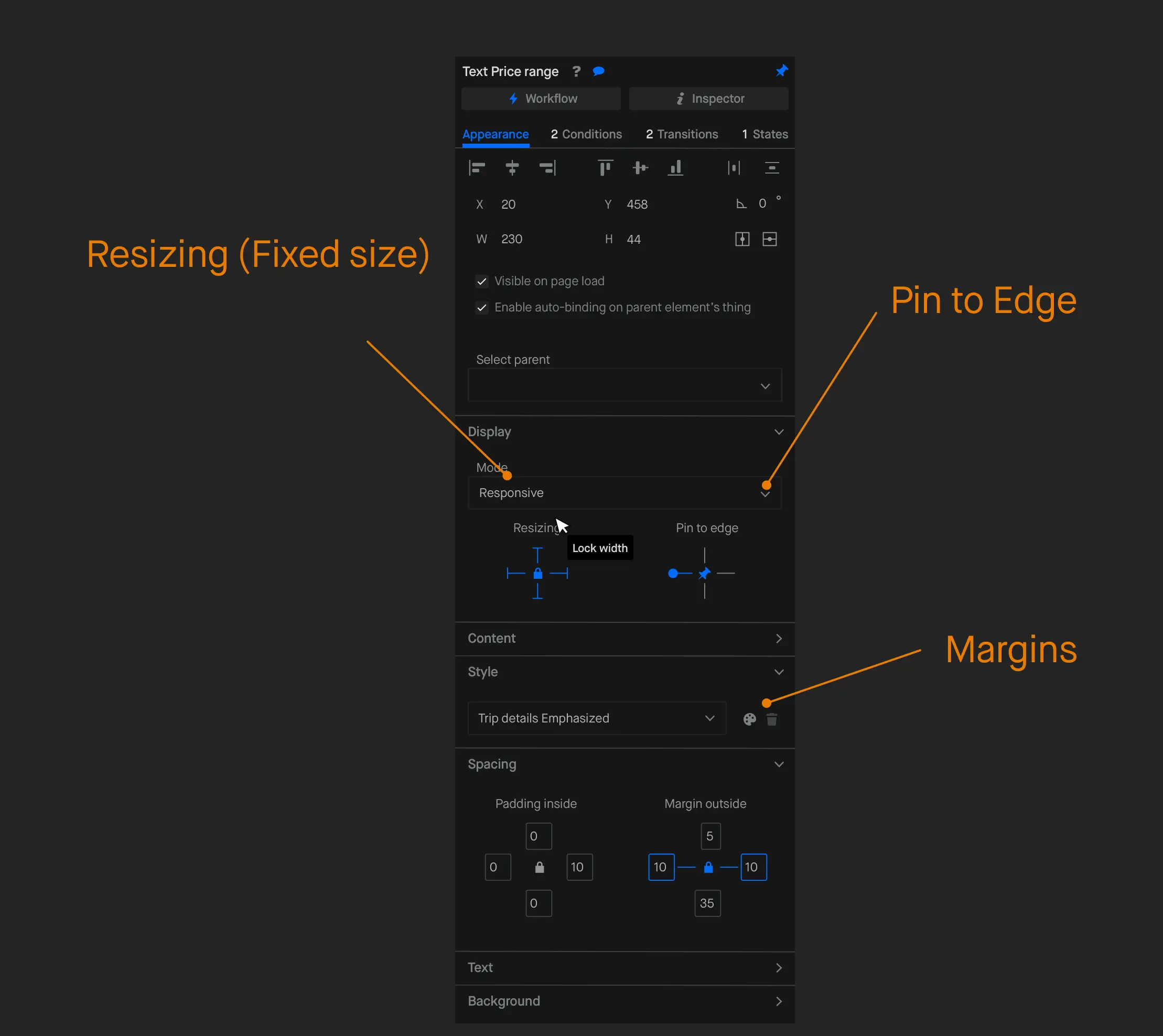
The core idea is to centralize responsive settings within the element’s property editor. Users can set and control responsive behaviors directly within each element’s editor, achieving flexible layouts with minimal effort.
The responsive system is built on three simple widgets: Resizing (Fixed Size), Pin to Edge, and Margins. These tools are similar to layout tools in Sketch. Resizing lets users specify fixed dimensions, Pin to Edge anchors elements to specific points on the canvas, and Margins create consistent spacing.
Bubble’s responsive toolset includes conditions that can be set for each element based on specific page widths, moving away from universal breakpoints. Designers can create custom conditions to govern how elements behave at different screen sizes. The Responsive button in the toolbar lets users preview how these conditions impact the layout by dragging the canvas width.
The property editor
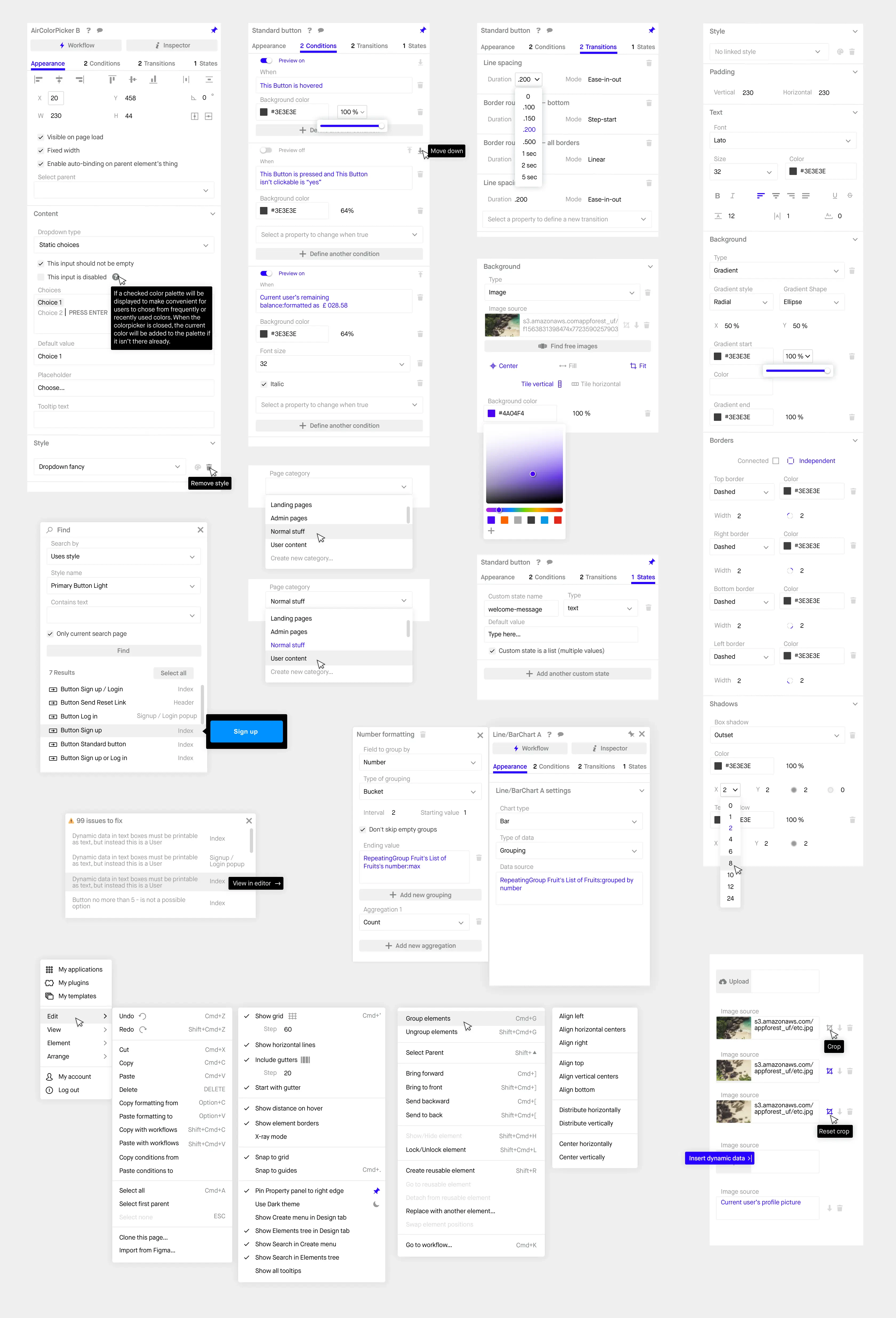
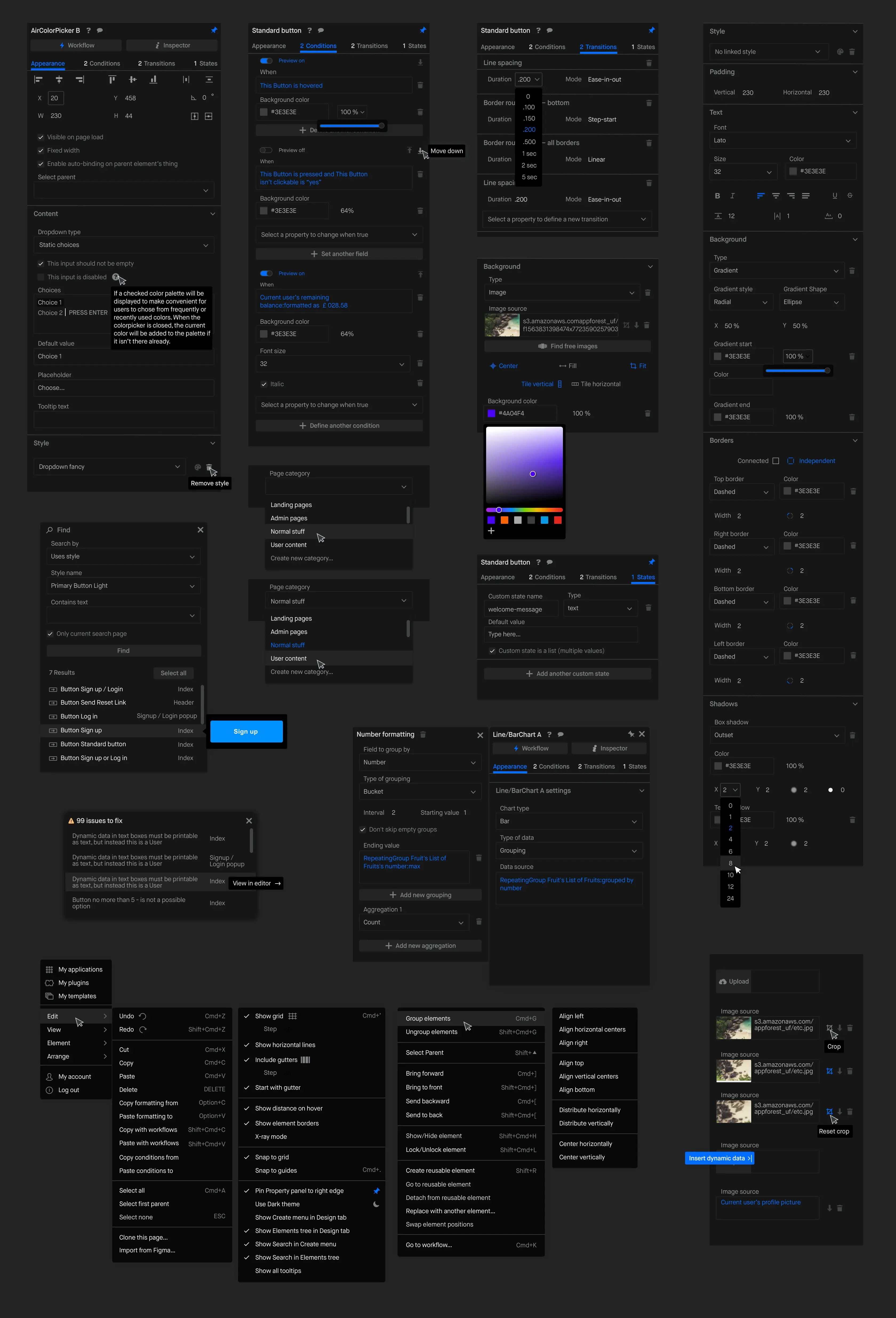
Maison shines in the property editor. It is where users configure each element’s appearance, behavior, and data connections. It also allows setting up conditional logic and connecting elements to workflows.
User research
I established a user research practice within our Customer Success team. As a lean team of 30, Bubble lacked resources for dedicated user research, so I trained Customer Success team members to take on UX research responsibilities. This created an efficient feedback loop that connected product design with real user insights.
Empowering our Customer Success team as UX researchers brought the voice of the customer directly into our development process. We could identify issues early, adapt designs in real-time, and maintain a user-centered approach with limited resources.

Rollout
We broke down the redesign into frequent, manageable releases. This let us deliver new components gradually while keeping users involved from the beginning. We solicited feedback on early concepts to ensure our design direction aligned with their needs.
By releasing updates regularly, we minimized the risk of overwhelming users with large-scale changes. This also allowed us to make real-time adjustments based on user feedback.
Project management
I used a project management approach called Shaping to define and structure project work, reducing timeline risks and maintaining momentum. Shaping allowed us to prioritize components and divide work effectively across the team.
This approach empowered our team to stay on track, shipping updates consistently while keeping users engaged. We minimized potential delays and avoided the risks associated with large, monolithic releases.
Visual and workflow tracks
We implemented a parallel strategy to manage the integration of new UX patterns into the existing UI. This hybrid approach allowed us to roll out visual and workflow improvements gradually, even as feature development continued. For features already in progress, we adapted elements of the new design system into the existing UI.
By releasing changes incrementally, we could monitor user reactions closely and adjust accordingly. This reduced the risk of disorienting users and ensured a smooth transition to the new interface.
Outcomes
Maison had a transformative impact on Bubble’s development and user experience. Developers can now roll out features with a consistent UI without needing direct design intervention. By establishing a unified set of rules and components, Maison streamlined the product development process and enabled faster development cycles.
Maison brought Bubble in line with best-in-class design tools like Figma and Webflow. By standardizing the UI and enhancing the overall visual experience, Maison has resulted in tangible benefits that are visible not only in qualitative feedback from users but also in measurable growth metrics.
The new design system elevated the user experience by introducing cohesive, predictable interactions. For Bubble users, Maison represents a significant improvement in how they interact with the platform. This leap forward helped solidify Bubble’s position in the no-code market.
Press & Links
- Bubble Raises $100M Series A to Empower the Next Generation of Software Creators
- Bubble - The full-stack, no-code app builder | Product Hunt
- Bubble Figma Integration | Product Hunt
- New Responsive Editor - Bubble | Product Hunt
Notes
-
Seven years of it. Emmanuel Straschnov and Josh Haas founded Bubble in 2012 and ran it on revenue alone until a $6.25M seed round led by SignalFire closed in June 2019, a few months into this project. The $100M Series A from Insight Partners came two years later, in July 2021. ↩
-
Flexbox reached W3C Candidate Recommendation in September 2012, the year Bubble was founded, and shipped unprefixed in every major browser by 2015. Bubble had spent its entire life computing layout in JavaScript that the browser could already do natively. ↩
-
It arrived over the course of the project: Safari 12.1 in March 2019, Firefox 67 in May, Chrome 76 in July, and Edge only with its Chromium rebuild (79) in January 2020. Maison’s toggle had to work on its own until then. ↩
-
The new engine went to open beta in November 2021 and became the default for every new app on June 27, 2022, with more than 27,000 apps already upgraded during the beta. Existing apps were never migrated automatically; each page moved over when its builder chose to. ↩